 SquareCount
Count anything from your Home Screen.
SquareCount puts a counter on your Home Screen. Tap +10 after a set of pull-ups or +1 after a glass of water, and the widget updates on the spot. You never have to open the app.

One tap logs it.
Every widget has its own buttons. Set up to three per tracker, so the amounts you log most are always one tap away.
- Fixed buttons for your usual amounts, like +6 and +10.
- An adjustable button: nudge it with − and + once, and every tap after that logs the new amount.
- Goals per day, per week, or a running total. A bar shows how far along you are.


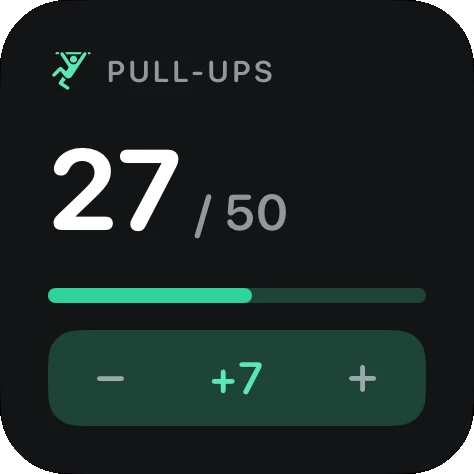
Small, medium or large.
Pick the size that fits your Home Screen. Small shows today and a button. Medium adds the last week. Large adds a progress ring, your averages and your streak.
Each tracker has its own colour and icon, and every widget follows your iPhone's light and dark appearance.


Step back through past weeks.
Tap ‹ on a medium or large widget to see the week before, then the one before that. The widget shows what that week added up to, how many days you hit your goal, and your best day.
Tap This week to come back, or leave it: after a few minutes the widget returns to today on its own.

Your month at a glance.
In the app, every tracker has a calendar. Each day is shaded by how much you logged, and the darkest days are the ones you hit your goal. Swipe between months, and tap a day to see and fix its entries.

Your numbers stay on your iPhone.
There's no account to make and nothing to sign up for. SquareCount has no ads, no analytics and no tracking. What you log is stored on your iPhone and nowhere else.
If you want a copy somewhere else, Pro can back up to a Google Sheet in your own Google Drive. You can export everything as a CSV file at any time. Read the privacy policy.
Free to use. Pro is one payment.
The free version never expires and never stops logging. Pro is a single purchase, not a subscription.
Free
- One tracker
- Small and medium widgets
- Your full history, and the calendar for the current month
- CSV export
- Siri and Shortcuts
Pro
- Unlimited trackers
- Large and Lock Screen widgets
- Past weeks on the widget, past months in the calendar, 14-day charts
- Reminders with log buttons in the notification
- Backup to your own Google Sheet